
FBD TIMER · WEAR OS · BETA
FBD Timer on your watch – Kellosiirto beta
Kellosiirto (“watch transfer”) is a FatBatDad Studio phone app that installs the FBD Timer Wear OS app from your phone to your watch over Wi-Fi – no computer needed.
For advanced beta testers. Installing requires the watch’s developer options. If you don’t want to touch them, wait for the regular release of the watch app. FBD Timer on the phone works without a watch.
Note: the Kellosiirto app is currently in Finnish only. The steps below explain each button.
Phone: Android 11 or newer · Watch: Wear OS 3 or newer (tested on Galaxy Watch Ultra 2) · Kellosiirto 1.0.0 Beta 9 · FBD Timer 0.7.1 BETA
Downloads
1. Kellosiirto (for the phone)
File: Kellosiirto-1.0.0-beta.9.apk · 12.5 MB
SHA-256: e41748bdc032b627074190001e747c22d8bcc7703926feaac7c8d0ec4d4fdf10
Signing certificate SHA-256: b542bc358614ae1e78d6209f8ef72c989d8de953b6f36184a46cae1ea9384fd3
Download Kellosiirto · 12.5 MB
2. FBD Timer – watch app (Wear OS)
File: FBDTimer-0.7.1-Wear.apk · 19.0 MB
SHA-256: c4585dff36ea7fd53c050daa600e8c4efc3acfaba847bc0f65b2d9ae609efeba
Signing certificate SHA-256: 72d98afe7fe8ade7571a4099b19e24a4d196f00af2637ecb45aa2fc51ded7f93
Download FBD Timer watch app · 19.0 MB
Download both files to your phone from this page only. Before installing, Kellosiirto shows the app name, version and the start and end of the signature – they must match the values above.
Installation
A. Install Kellosiirto on the phone
Open the downloaded Kellosiirto-1.0.0-beta.9.apk. Android may ask you to allow installs from this browser or file app. Allow it only if the source and file match, and remove the permission afterwards if you like. Do not install the watch APK on the phone – you select it inside Kellosiirto.
B. Prepare the watch (once)
- Connect the watch and the phone to the same Wi-Fi network, preferably your home network. Don’t use public Wi-Fi.
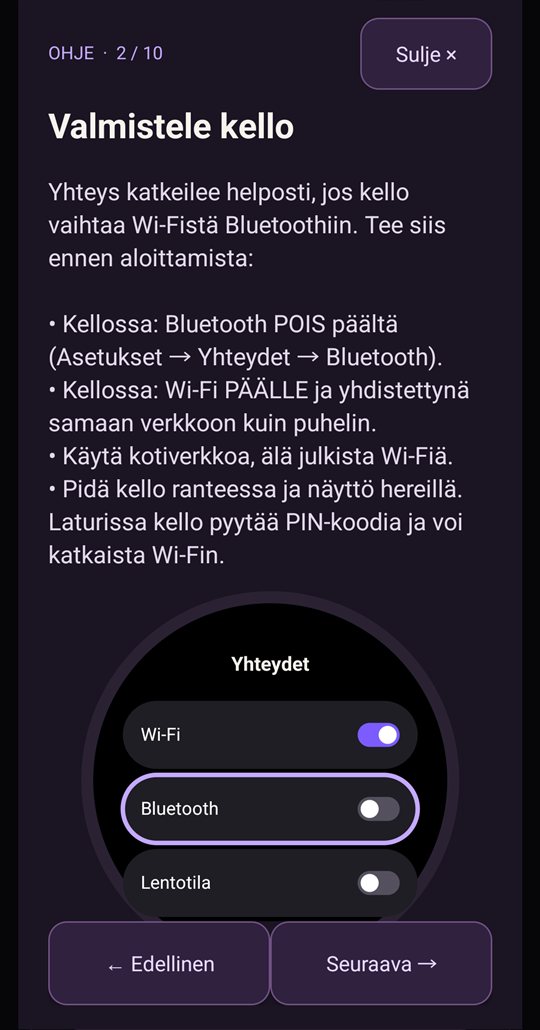
- On the watch: turn Bluetooth off during the install. Then check that the watch is still connected to Wi-Fi.
- On the watch: Settings → About watch → Software information → tap Software version 5 times. Developer options appear.
- Settings → Developer options: turn on ADB debugging, the option that keeps Wi-Fi from switching off automatically, and Wireless debugging. Accept the watch’s prompt.
- Keep the watch on your wrist with the screen awake. On the charger the watch asks for its PIN and may drop Wi-Fi.
C. Pair (first time only)
- Open Kellosiirto on the phone.
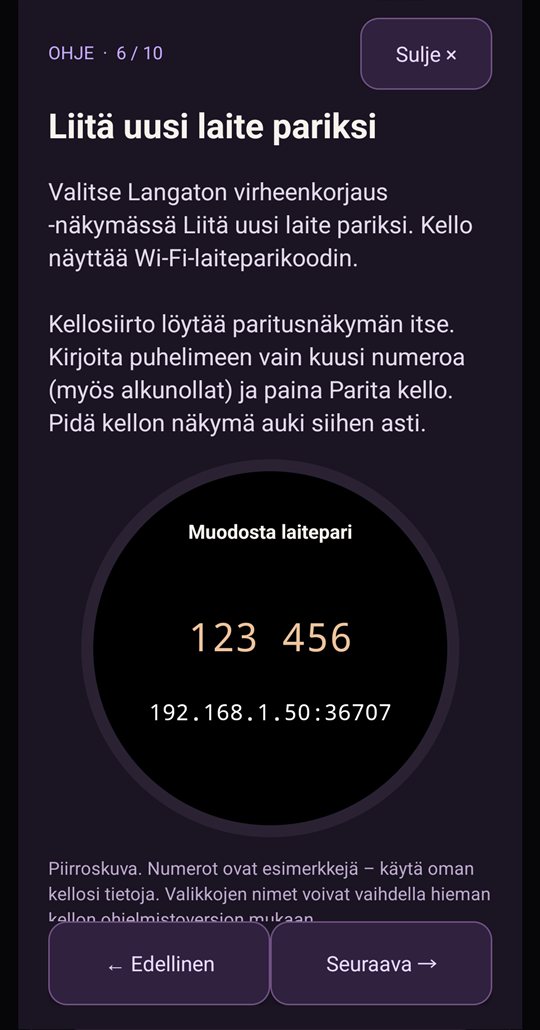
- On the watch, choose Wireless debugging → Pair new device. Kellosiirto finds the watch by itself (“Kellon paritusnäkymä löytyi”).
- Type the six-digit code shown on the watch into Kellosiirto and tap Parita kello (Pair watch).
D. Install FBD Timer on the watch
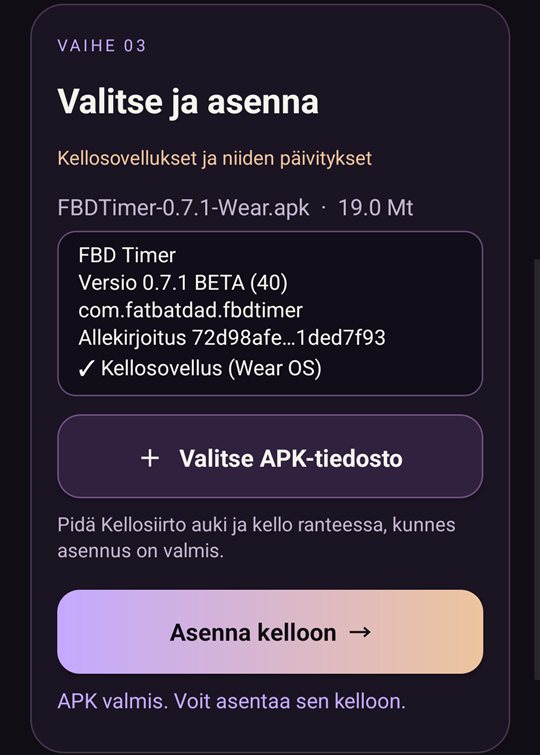
- In Kellosiirto tap Valitse APK-tiedosto (Choose APK file) and pick
FBDTimer-0.7.1-Wear.apk. - Check the details: FBD Timer, 0.7.1 BETA, “Kellosovellus (Wear OS)”, signature 72d98afe…1ded7f93.
- Tap Asenna kelloon (Install to watch). It takes about a minute. Keep Kellosiirto open.
E. Finally – important
Turn Wireless debugging off on the watch and turn Bluetooth back on. Pairing is kept: for the next update, just turn Wireless debugging on for a moment.
Troubleshooting
- Kellosiirto can’t find the watch: make sure the watch is on the same Wi-Fi as the phone (it may drop Wi-Fi when Bluetooth is turned off) and Wireless debugging is on. If your network blocks discovery (e.g. guest networks), enter the IP address and ports under Lisäasetukset (Advanced).
- The connection drops: Bluetooth off, automatic Wi-Fi switching off, watch on your wrist with the screen awake.
- “Different signature”: the watch has FBD Timer from another source. Remove it from the watch and install again (FBD Timer data on the watch is removed).
Privacy and safety
Kellosiirto does not collect or send any data to FatBatDad Studio or third parties. It only connects to your watch on your own local network. The phone stores only the watch’s name and address and Kellosiirto’s own private pairing key, which never leaves the phone. Kellosiirto is a beta version.
Back to the FBD Timer betaPrivacy policyBeta use and safetyFeedback